Travel plans can change quickly, and the last thing you want is to discover that your passport has expired just before your trip. Thankfully, eligible U.S. travelers can renew your passport online, making the process faster and more convenient than traditional paper applications.
Whether you’re planning an international vacation, studying abroad, taking a cruise, or traveling for business, understanding how to renew your passport online can save time, reduce stress, and help you avoid unnecessary delays.
This comprehensive guide explains everything you need to know—from eligibility requirements and required documents to processing times, fees, expert advice, and common mistakes. By the end, you’ll know exactly how to complete your passport renewal with confidence.
What Does It Mean to Renew Your Passport Online?
Renewing your passport online means completing your passport renewal application digitally instead of mailing paper forms or visiting a passport acceptance office.
Instead of printing forms and mailing documents, eligible applicants can:
- Complete the application online
- Upload a digital passport photo
- Pay government fees securely
- Submit the application electronically
- Track application progress online
The online renewal system simplifies the experience while maintaining the same security standards used for traditional passport applications.
For many travelers, this option is the fastest and easiest way to keep their passport current.
Why More Americans Choose Online Passport Renewal
More travelers are choosing online renewal because it offers greater convenience and flexibility.
Some of the biggest advantages include:
| Benefit | Why It Matters |
| Apply from home | No need to visit a passport office |
| Digital application | Less paperwork |
| Secure payment | Pay online safely |
| Easy tracking | Monitor your application status |
| Time saving | Complete the application whenever it’s convenient |
| Fewer mailing concerns | Reduced risk of lost paperwork |
For busy professionals, families, students, and frequent travelers, online renewal can significantly simplify the passport renewal process.
Benefits of Renewing Your Passport Online
Choosing to renew your passport online offers several advantages compared to the traditional paper application process.
1. Save Time
You can complete the application from your computer without scheduling appointments or waiting in long lines.
2. Apply Anytime
The online system allows eligible applicants to submit their passport renewal from almost anywhere with an internet connection.
3. Secure Online Payment
Government processing fees can be paid securely through the online portal using approved payment methods.
4. Digital Document Submission
Instead of mailing physical paperwork, you’ll upload a digital passport photo and complete everything electronically.
5. Application Tracking
Once submitted, applicants can monitor the progress of their renewal and stay informed about processing updates.
6. Reduced Paperwork
Online renewal minimizes printing, mailing, and handling physical documents, making the process more environmentally friendly and convenient.
Is Online Passport Renewal Right for You?
Online renewal works well for many travelers, but it isn’t available in every situation.
It may be an excellent option if you:
- Travel internationally for vacations
- Frequently travel for work
- Study abroad
- Need a valid passport before future travel
- Prefer completing government applications online
- Want to avoid mailing paper forms
However, certain applicants—including first-time passport applicants or those with specific passport issues—may need to apply using a different process.
In the next section, we’ll explain the exact eligibility requirements and help you determine whether you qualify to renew your passport online.
Who Can Renew Your Passport Online?
Before you renew your passport online, make sure you meet the eligibility requirements. Not everyone qualifies for online renewal, so it’s important to check the rules before starting your application.
In general, you may be eligible if:
- You are a U.S. citizen.
- Your most recent passport is or was valid for 10 years.
- Your passport is not damaged, lost, or stolen.
- You are renewing an adult passport.
- Your passport was issued within the required renewal period.
- You can upload a digital passport photo.
- You can pay the renewal fee online.
Meeting these requirements allows you to complete the entire renewal process electronically without mailing paper forms.
Who Cannot Renew a Passport Online?
Some travelers must use a different application method instead of online renewal.
You may not be eligible if:
- You’re applying for your first U.S. passport.
- Your passport has been lost or stolen.
- Your passport is severely damaged.
- You’re applying for a child’s passport (under age 16).
- Your passport requires major corrections beyond standard renewal.
- You don’t meet the current online renewal eligibility rules.
If any of these situations apply, you’ll need to follow the appropriate passport application process instead.
Online Renewal Eligibility at a Glance
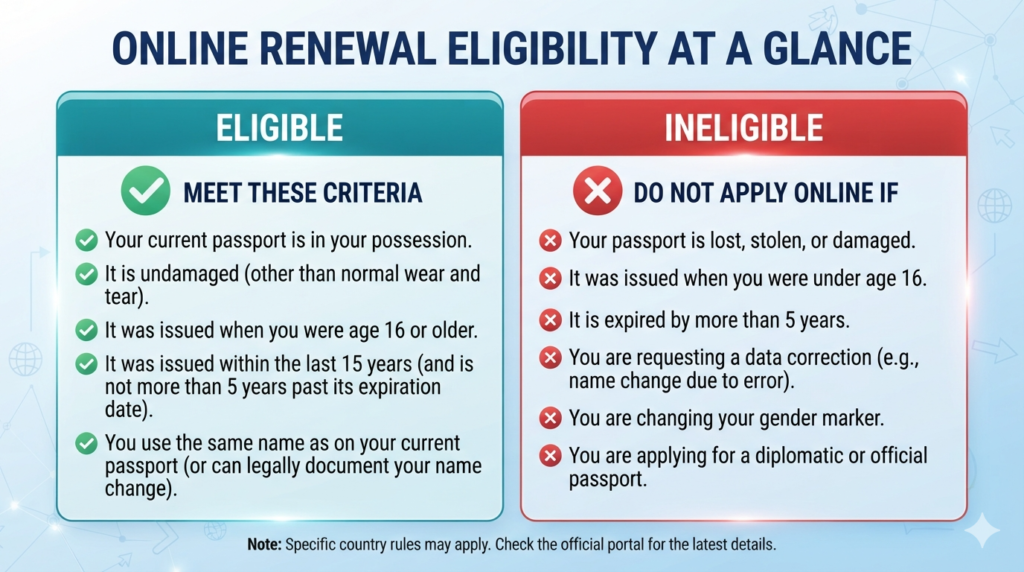
| Situation | Online Renewal Eligible? |
| Adult passport renewal | ✅ Yes (if eligible) |
| First-time passport | ❌ No |
| Lost passport | ❌ No |
| Stolen passport | ❌ No |
| Damaged passport | ❌ No |
| Child passport | ❌ No |
| Routine adult renewal | ✅ Usually Yes |
Documents Needed to Renew Your Passport Online
Preparing everything in advance makes the application much smoother.
Here’s what you’ll typically need before you begin.
1. Current Passport
Your existing passport information will be required during the renewal process.
2. Digital Passport Photo
A recent passport photo must meet official requirements.
Your photo should:
- Be in color
- Have a plain white or off-white background
- Show your full face
- Have good lighting
- Be high resolution
- Avoid filters or heavy editing
A poor-quality photo is one of the most common reasons applications are delayed.
3. Personal Information
You’ll need to provide information such as:
- Full legal name
- Date of birth
- Place of birth
- Contact information
- Current mailing address
- Email address
Double-check every detail before submitting
4. Payment Method
Have an accepted payment method ready for the passport renewal fee.
Online payment is completed securely during the application process.
Required Documents Checklist
| Document | Required |
| Current passport | ✅ |
| Digital passport photo | ✅ |
| Personal information | ✅ |
| Email address | ✅ |
| Payment method | ✅ |
Passport Photo Requirements
Uploading the correct passport photo is one of the most important parts of renewing your passport online.
Your passport photo should:
- Be taken recently.
- Show a neutral facial expression.
- Face the camera directly.
- Remove sunglasses.
- Avoid hats unless required for religious or medical reasons.
- Use proper lighting without shadows.
- Keep the background plain.
Avoid These Mistakes
- Blurry images
- Selfies
- Filters
- Dark lighting
- Busy backgrounds
- Cropped faces
- Smiling too much
- Wearing tinted glasses
Taking a few extra minutes to prepare a compliant photo can help prevent delays.
Step-by-Step Guide to Renew Your Passport Online
Follow these simple steps to complete your renewal.
Confirm Your Eligibility
Before starting, verify that you qualify for online renewal.
This prevents unnecessary delays and ensures you’re using the correct application process.
Gather Required Documents
Prepare:
- Current passport
- Digital passport photo
- Personal information
- Payment method
Having everything ready helps you complete the application in one sitting.
Complete the Online Application
Carefully enter all requested information.
Take your time and review every section before moving to the next page.
Common information includes:
- Name
- Date of birth
- Passport details
- Contact information
- Mailing address
Upload Your Passport Photo
Upload your digital passport photo according to the specified requirements.
If the image doesn’t meet the standards, you’ll usually be prompted to upload another one.
Review Your Information
Before submitting, carefully check:
- Spelling
- Passport number
- Date of birth
- Address
- Uploaded photo
Small mistakes can delay processing.
Pay the Renewal Fee
Complete your payment using an approved payment method.
Keep your confirmation for future reference.
Submit Your Application
After reviewing everything, submit your application electronically.
You’ll receive confirmation that your renewal request has been received.
Track Your Passport Renewal
After submission, monitor your application status through the official tracking system.
Tracking helps you stay informed about processing progress and expected delivery.
Online Renewal vs Traditional Renewal
| Feature | Online Renewal | Mail Renewal |
| Paper forms | ❌ No | ✅ Yes |
| Upload digital photo | ✅ Yes | ❌ No |
| Online payment | ✅ Yes | ❌ No |
| Mail documents | ❌ No | ✅ Yes |
| Apply from home | ✅ Yes | Partial |
| Track application | ✅ Easy | Limited |
Passport Renewal Fees
One of the most common questions travelers ask before they renew your passport online is how much it costs. The total fee depends on the type of passport you renew and whether you choose routine or expedited processing.
Since government fees can change, always verify the latest pricing before submitting your application.
Typical Costs May Include
- Passport renewal application fee
- Expedited processing fee (optional)
- Faster return delivery (optional)
Tip: Budget a little extra if you need your passport quickly for upcoming travel.
Routine vs. Expedited Processing
If you have international travel planned soon, understanding processing times is essential.
| Feature | Routine Processing | Expedited Processing |
| Cost | Lower | Higher |
| Best For | Future travel | Urgent travel |
| Processing Speed | Standard | Faster |
| Additional Fee | No | Yes |
Routine processing is ideal if your trip is several months away.
Expedited processing is recommended when you have confirmed travel plans and need your passport sooner.
When Should You Renew Your Passport?
Many countries require your passport to remain valid for at least six months after your arrival date.
Because of this, travel experts recommend renewing your passport well before it expires.
A Good Rule of Thumb
| Passport Status | Recommended Action |
| More than 1 year remaining | No action needed |
| 6–12 months remaining | Plan your renewal |
| Less than 6 months remaining | Renew as soon as possible |
| Already expired (if eligible) | Begin renewal immediately |
Renewing early helps you avoid last-minute travel stress.
How Long Does Online Passport Renewal Take?
Processing times vary throughout the year. During busy travel seasons, applications may take longer than expected.
Several factors can affect your timeline:
- Seasonal demand
- Holidays
- Application accuracy
- Photo approval
- Government workload
Submitting a complete and accurate application is one of the best ways to avoid delays.
Factors That Can Delay Your Passport
Even a small mistake can slow down the renewal process.
Common reasons include:
- Incorrect personal information
- Missing details
- Invalid passport photo
- Payment problems
- Eligibility issues
- Incomplete application
Always review your application carefully before submitting.
Common Mistakes When You Renew Your Passport Online
Avoiding these mistakes can save you time and frustration.
1. Waiting Until the Last Minute
Many travelers don’t think about their passport until they’ve already booked flights.
Renew early to avoid unnecessary stress.
2. Uploading the Wrong Photo
A photo that doesn’t meet official requirements is one of the leading causes of delays.
Always use a recent, high-quality image with a plain background.
3. Typing Incorrect Information
Double-check:
- Full name
- Birth date
- Passport number
- Address
Even one typo can delay processing.
4. Ignoring the Six-Month Validity Rule
Some travelers assume an unexpired passport is enough.
However, many destinations require six months of remaining validity before allowing entry.
5. Using an Unstable Internet Connection
Because you’re completing an online application, use a secure and reliable internet connection to avoid interruptions.
6. Forgetting to Save Confirmation Information
After submitting your application:
- Save your confirmation email.
- Record your application number.
- Keep payment confirmation.
These details make it easier to track your renewal.
Expert Tips for a Smooth Passport Renewal
Travel professionals recommend following these best practices.
✔ Renew Early
Don’t wait until your passport is about to expire.
Early renewal provides more flexibility for future travel.
✔ Take a Professional Passport Photo
Although you can take your own photo if it meets requirements, many travelers prefer professional passport photo services to reduce the chance of rejection.
✔ Apply During Slower Travel Seasons
Applications submitted outside peak vacation periods may experience fewer delays.
✔ Review Everything Twice
Before submitting:
- Check spelling.
- Confirm passport details.
- Review your uploaded photo.
- Verify your payment information.
Five extra minutes can prevent weeks of delays.
✔ Keep Digital Copies
Save copies of:
- Confirmation email
- Payment receipt
- Passport photo
- Application details
Having digital backups can be helpful if you need to reference your submission later.
Real-Life Example
Sarah’s Vacation to Italy
Sarah planned a summer vacation to Italy with friends.
While reviewing her travel documents, she noticed her passport would expire five months after her trip.
Knowing many countries expect at least six months of passport validity, she decided to renew your passport online several months before departure.
Because she applied early, uploaded a compliant passport photo, and carefully reviewed her application, she received her renewed passport well before her vacation—avoiding last-minute stress.
Passport Renewal Timeline Example
| Timeline Before Trip | Recommended Action |
| 12 months | Check passport expiration |
| 9 months | Gather renewal documents |
| 6 months | Submit renewal application |
| 3 months | Confirm passport arrival |
| 1 month | Verify travel documents |
Pros and Cons of Renewing Your Passport Online
| Pros | Cons |
| Apply from home | Not everyone is eligible |
| Less paperwork | Requires internet access |
| Easy application tracking | Digital photo must meet requirements |
| Secure online payment | Errors can still delay processing |
| Convenient for busy travelers | Peak seasons may increase wait times |
Troubleshooting Common Passport Renewal Issues
Even if you carefully prepare your application, you may run into a few issues while trying to renew your passport online. The good news is that most problems can be resolved quickly if you know what to do.
1. Your Digital Photo Is Rejected
A rejected passport photo is one of the most common reasons for delays.
Possible Reasons
- Blurry image
- Poor lighting
- Incorrect background
- Face partially covered
- Low image resolution
- Photo is too old
- Filters or edits applied
How to Fix It
- Take a new photo in natural lighting.
- Use a plain white or off-white background.
- Look directly at the camera.
- Remove hats and sunglasses (unless medically or religiously required).
- Upload the new photo according to the instructions.
2. Payment Doesn’t Go Through
Sometimes an online payment may fail due to technical or banking issues.
Try These Solutions
- Confirm your card details are correct.
- Check that your card has sufficient funds.
- Try a different payment method if available.
- Avoid refreshing the page during payment.
- Wait a few minutes and try again if the system is busy.
3. I Didn’t Receive a Confirmation Email
If your application appears to have been submitted but you haven’t received confirmation:
- Check your spam or junk folder.
- Verify that you entered the correct email address.
- Allow some time for processing.
- Use your application reference number (if available) to check your status.
4. My Passport Renewal Is Taking Longer Than Expected
Processing times can vary depending on application volume and the time of year.
Delays may occur because of:
- High travel demand
- Incomplete applications
- Incorrect passport photos
- Payment verification
- Additional identity verification
If your travel date is approaching, monitor your application regularly and follow the official guidance for urgent travel if applicable.
Security Tips When Renewing Your Passport Online
Because you’ll be submitting personal information online, protecting your data is important.
Use a Secure Internet Connection
Avoid completing your application on public Wi-Fi networks in places like airports, cafés, or hotels.
A secure home or trusted private network helps protect your information.
Protect Your Personal Information
Never share:
- Passport number
- Payment details
- Security codes
- Login credentials
- Personal identification information
Only enter your information through the official passport renewal system.
Create Strong Passwords
If you create an online account, use a password that includes:
- Uppercase letters
- Lowercase letters
- Numbers
- Special characters
Avoid using the same password across multiple websites.
Keep Copies of Important Documents
Save digital copies of:
- Confirmation email
- Payment receipt
- Passport photo
- Application reference number
Store them securely in case you need them later.
Best Time of Year to Renew Your Passport
Many travelers wait until spring or early summer to renew their passports. Unfortunately, this is also when demand tends to be highest.
Consider Renewing During:
- Fall
- Early winter
- After major holiday travel seasons
Submitting your renewal during less busy periods may help reduce waiting times.
Travel Planning Tips After Passport Renewal
Once your renewed passport arrives, take a few minutes to review it.
Check the Following
- Correct spelling of your name
- Date of birth
- Passport number
- Expiration date
- Signature (if required)
- Overall condition
If you notice an error, begin the correction process as soon as possible.
International Travel Preparation Checklist
Before booking your next trip, confirm that you have:
| Task | Complete |
| Passport renewed | ✅ |
| Passport validity checked | ✅ |
| Destination visa requirements reviewed | ✅ |
| Flight reservations confirmed | ✅ |
| Hotel bookings completed | ✅ |
| Travel insurance purchased | ✅ |
| Emergency contacts saved | ✅ |
| Copies of passport stored securely | ✅ |
Advanced Tips for Frequent Travelers

If you travel internationally several times a year, developing good passport habits can save time and reduce stress.
Keep Your Passport in Good Condition
Avoid:
- Folding the passport
- Writing inside the pages
- Exposing it to water
- Storing it in extreme heat
- Damaging the cover
A well-maintained passport is less likely to cause issues during travel.
Monitor the Expiration Date
Set a calendar reminder at least 9–12 months before your passport expires. This gives you plenty of time to renew your passport online without worrying about upcoming trips.
Store Digital Copies Securely
Keep secure digital copies of:
- Passport identification page
- Travel itinerary
- Emergency contacts
- Important travel documents
These copies can be helpful if your passport is lost while traveling.
Common Mistakes Recap
Here’s a quick summary of mistakes to avoid:
| Mistake | Better Approach |
| Waiting until the passport expires | Renew early |
| Uploading a poor-quality photo | Follow official photo guidelines |
| Entering incorrect personal details | Review every field carefully |
| Ignoring passport validity rules | Check destination requirements |
| Forgetting confirmation details | Save all receipts and emails |
| Using public Wi-Fi | Use a secure private network |
Conclusion
Renewing your passport doesn’t have to be complicated. If you’re eligible to renew your passport online, the digital process offers a convenient way to complete your application from home, upload your passport photo, pay securely, and track your renewal status.
The key to a smooth experience is preparation. Gather your documents in advance, make sure your passport photo meets the official requirements, review your information carefully, and apply well before your next international trip. Renewing early helps you avoid unnecessary stress and gives you peace of mind before traveling.
Whether you’re planning a family vacation, a business trip, studying abroad, or your next adventure, keeping your passport valid is one of the most important steps in travel planning.
Ready to travel? Check your passport’s expiration date today and, if you’re eligible, renew your passport online before booking your next international journey.
FAQs
Can I renew my passport online?
Yes. Eligible U.S. citizens can renew their passport online using the official passport renewal system, provided they meet the current eligibility requirements.
How long does it take to renew a passport online?
Processing times vary depending on demand and the service selected. Routine service generally takes longer than expedited service.
Can I travel while my passport renewal is being processed?
No. If your current passport has been submitted for renewal, you should wait until you receive your renewed passport before making international travel plans.
Do I need a new passport photo?
Yes. You’ll need to upload a recent digital passport photo that meets the official photo requirements.
Can I renew an expired passport online?
In many cases, eligible applicants can renew an expired adult passport online if it meets the applicable renewal requirements.
What happens if my passport photo is rejected?
You’ll usually be asked to upload a new photo that meets the official specifications before your application can continue.
Is online passport renewal secure?
Yes. The official online renewal system uses secure technology to protect your personal and payment information.
What if I lose my passport?
A lost or stolen passport cannot typically be renewed online. You’ll need to follow the official replacement process.
Can I renew a child’s passport online?
No. Child passports generally require a different application process and are not eligible for online renewal.
How early should I renew my passport?
Travel experts recommend renewing your passport at least 6–9 months before it expires, especially if you plan to travel internationally.
Read More: TSA PreCheck: The Ultimate 2026 Guide to Faster Airport Security, Costs, Benefits & How to Apply